One API. Five Databases. Zero Rewrites.

Schema, metadata, and connections—unified for lean data teams working across BigQuery, Snowflake, Redshift, SQL Server, and PostgreSQL.

PyPI version Python Support License Tests
$ pip install schema-mapper[all]
BigQuery Snowflake Redshift SQL Server PostgreSQL

Stop Wrestling with Platform-Specific APIs

One canonical approach replaces fragmented tooling

The Old Way: Platform Chaos
  • Different SDK for each database platform
  • Hand-write DDL for every migration
  • Debug type mismatches across platforms
  • No standard for schema management
  • Metadata lives in tribal knowledge
  • 5x the code, 5x the maintenance burden
The schema-mapper Way: One API
  • Unified connections → Single API for all 5 platforms
  • Canonical schema → Define once, deploy everywhere
  • Built-in metadata → Documentation that never drifts
  • PII governance → Compliance baked into schemas
  • Connection pooling → Production-ready from day one
  • One codebase → Write once, run anywhere

How It Works

A proven 4-stage Extract-Load pipeline

1. Profile Your Data

Understand data quality, detect anomalies, and identify issues before loading.

  • Statistical analysis beyond pandas describe()
  • Automated quality scoring (0-100)
  • Anomaly detection (IQR, Z-score, Isolation Forest)
  • Pattern recognition (emails, phones, dates)

2. Clean & Preprocess

Standardize formats, fix errors, handle missing values, and validate data.

  • Format standardization (dates, phones, currency)
  • Smart deduplication (exact & fuzzy matching)
  • Missing value imputation (multiple strategies)
  • Email & phone validation with auto-correction

3. Generate Schemas

Create optimized schemas with the right types, modes, and platform-specific features.

  • Automatic type detection (dates, numbers, booleans)
  • SQL-compliant column naming
  • REQUIRED vs NULLABLE inference
  • Canonical schema → render to any platform

4. Load to Any Database

Export DDL, JSON schemas, or CLI commands ready for your target platform.

  • Production-ready CREATE TABLE statements
  • Clustering, partitioning, distribution strategies
  • Platform-specific optimizations
  • BigQuery JSON schema export

Built For Data Teams

Whether you're migrating clouds, building pipelines, or prototyping architectures

Data Engineers

Building multi-cloud data pipelines at scale

Without schema-mapper
  • Manually write schemas for each platform
  • Debug type mismatches across databases
  • Spend hours on schema migrations
  • Risk data loss from human errors
With schema-mapper
  • Profile data quality → detect issues before they become problems
  • Auto-clean messy data → standardize dates, emails, phones automatically
  • One canonical schema → deploy to 5 platforms instantly
  • Pre-flight validation → catch errors before load

Analytics Engineers

Accelerating dbt workflows and analytics delivery

Without schema-mapper
  • Hardcode DDL for every new source
  • Wait for data eng to create tables
  • Manual column name cleanup
  • No clustering or partitioning strategies
With schema-mapper
  • Quality reports → comprehensive data profiling in seconds
  • Auto-clean pipelines → reproducible preprocessing workflows
  • Auto-generate DDL → production-ready CREATE statements
  • Optimized tables → clustering & partitioning baked in

Data Scientists

ML preprocessing and feature engineering workflows (v1.3.0)

Without schema-mapper
  • Manual feature importance analysis
  • Write custom encoding logic for every dataset
  • Time-consuming EDA and profiling
  • Repetitive categorical encoding code
With schema-mapper
  • Target correlation analysis → identify important features automatically
  • Auto-encode categoricals → smart detection with configurable thresholds
  • Feature importance viz → color-coded charts with one line of code
  • ML-ready pipelines → from raw data to model input automatically

Platform Teams

Standardizing data practices across the organization

Without schema-mapper
  • Inconsistent schemas across teams
  • No standard for column naming
  • Each team reinvents schema tooling
  • Hard to enforce data contracts
With schema-mapper
  • Single source of truth → canonical schema standard
  • Org-wide naming → consistent column conventions
  • Reusable tooling → entire org on one library
  • Data contracts → enforce quality with validation

What's New in v1.3.0

DataFrame-first API, Enhanced Database Discovery, and ML Feature Engineering—Query once, analyze anywhere, DataFrames everywhere

DataFrame Query Results

All database queries return pandas DataFrames. Consistent API across all 5 platforms.

  • Automatic conversion from cursors/iterators to DataFrames
  • Immediate DataFrame access—no more iteration
  • Enhanced error handling with ExecutionError
  • Same code works for all platforms

Enhanced Database Discovery

Programmatically explore your entire data warehouse with introspection methods.

  • get_tables() with detailed metadata (size, rows, created)
  • get_schemas() / get_datasets() for structure exploration
  • get_database_tree() with dict/DataFrame output formats
  • Export complete warehouse inventories

ML Feature Engineering

Intelligent feature analysis and automated preprocessing for machine learning workflows.

  • Target correlation analysis for feature importance
  • Auto-detect and encode categorical columns
  • Feature importance visualization with color-coded charts
  • Automatic binary/multi-class target encoding

Enhanced Visualizations

Customizable plotting with sensible defaults for data profiling and analysis.

  • Custom color parameters (default: dark blue-grey)
  • Scatter plot matrix with trend lines
  • Automatic axis and title labeling
  • Matplotlib abstraction for ease of use

Stop writing and debugging schemas, start loading data

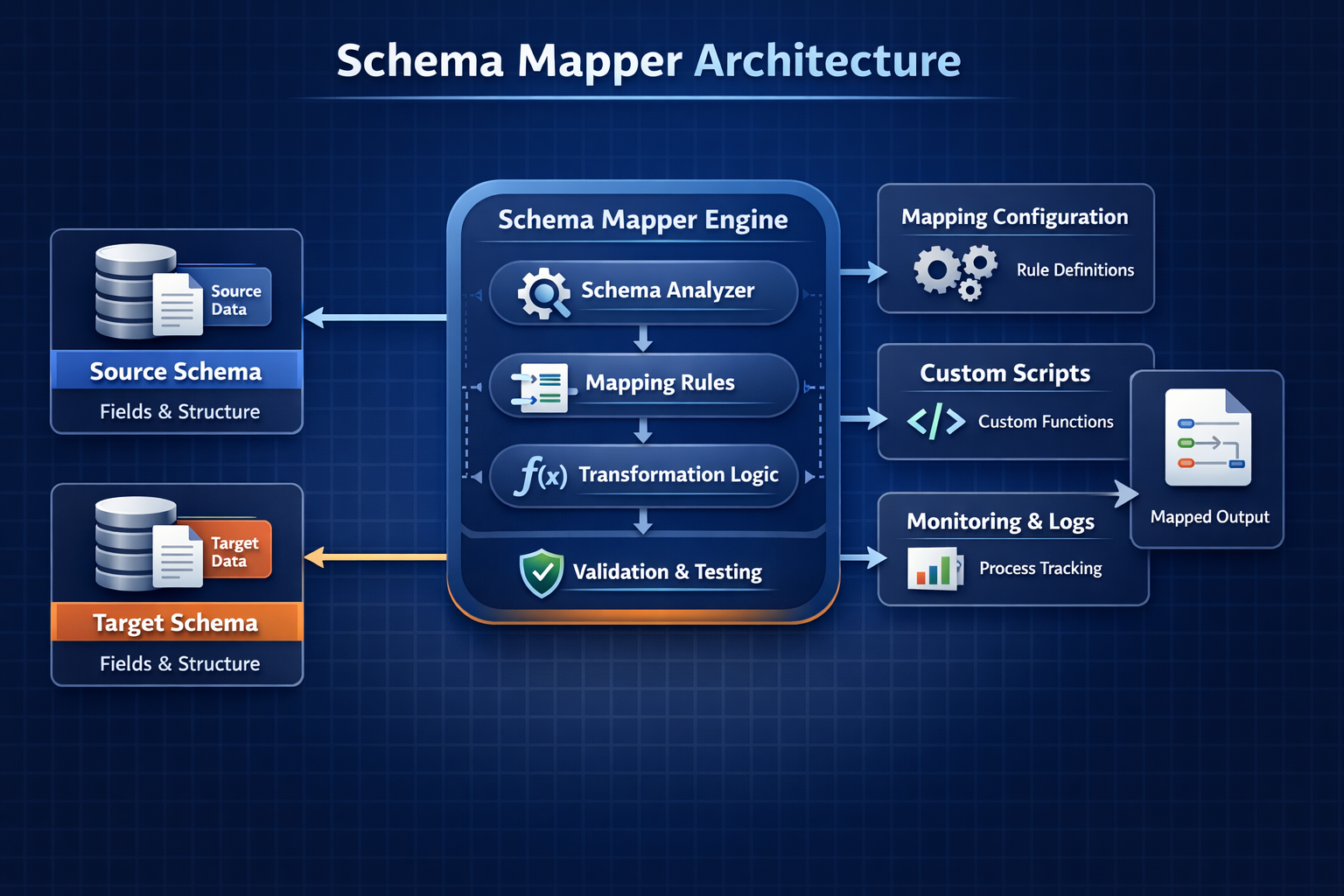
Schema Mapper Architecture

Why schema-mapper?

Multi-Cloud Migrations

Moving from Redshift to Snowflake? Replatforming to BigQuery? Generate platform-specific schemas instantly without rewriting everything.

  • Zero manual schema translation
  • Consistent type mapping
  • Production-ready DDL

Automated Data Pipelines

Stop hardcoding schemas in your ETL. Auto-detect types, clean column names, validate data quality — all before you load.

  • Infer schema from CSVs automatically
  • Standardize messy column names
  • Pre-flight validation checks

Performance Optimization

Generate DDL with clustering, partitioning, and distribution strategies baked in. Platform-optimized out of the box.

  • Auto-partition by date columns
  • Cluster by high-cardinality fields
  • Distribution keys for Redshift

Rapid Prototyping

Test data architectures across platforms in minutes. Compare BigQuery vs Snowflake performance before you commit.

  • Deploy to 5 platforms instantly
  • A/B test database choices
  • Fail fast, iterate faster

Complete Data Platform Toolkit

Unified Connections

Single API for BigQuery, Snowflake, Redshift, SQL Server, PostgreSQL. One codebase, zero lock-in.

Metadata Management

YAML-driven schemas with built-in governance. Auto-generate data dictionaries and documentation.

Incremental Loads

UPSERT, SCD Type 2, CDC patterns. Platform-optimized MERGE statements for all databases.

Connection Pooling

Thread-safe pools with health checks. Built for high-concurrency production workloads.

Data Profiling

Quality scores, anomaly detection, pattern recognition. Understand data before you load it.

Data Preprocessing

Standardization, validation, cleaning, deduplication. Reproducible preprocessing pipelines.

ML Feature Engineering v1.3.0

Target correlation analysis and auto-encoding. Feature importance identification for ML workflows.

Database Discovery v1.3.0

Introspect warehouse structure programmatically. Export table inventories with metadata.

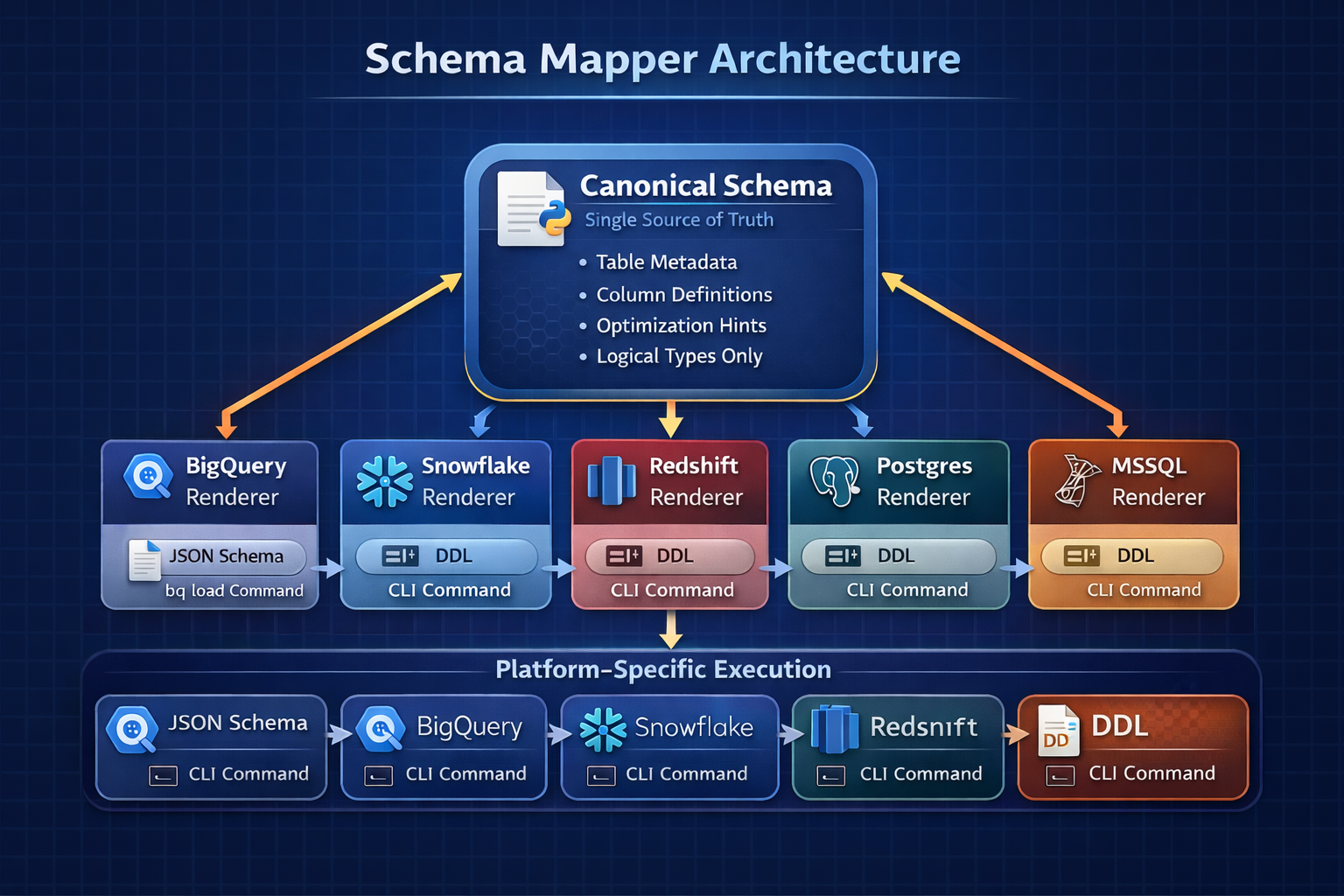
Canonical Schema

Platform-agnostic schema format. Define once, render to any database on demand.

Smart Type Detection

Auto-detect dates, numbers, booleans. No manual type casting or schema guesswork.

PII Governance

Built-in PII flags and metadata validation. Compliance-ready from day one.

DDL Generation

Production-ready CREATE TABLE with clustering, partitioning, and optimization baked in.

Auto-Retry Logic

Exponential backoff for transient errors. Built-in resilience for production pipelines.

Transaction Support

Context managers and savepoints. Atomic operations across all supported platforms.

Canonical Schema Architecture

Infer once. Render everywhere. Your single source of truth.

Canonical Schema Flow
No vendor lock-in — switch databases without rewriting schemas
Consistent type mapping across all platforms
Extensible renderer pattern — add new databases easily

Installation

Basic Installation

pip install schema-mapper

Core package only — no platform dependencies

Platform-Specific

pip install schema-mapper[bigquery]
pip install schema-mapper[snowflake]
pip install schema-mapper[redshift]

Install only what you need

All Features

pip install schema-mapper[all]

Everything included — profiling, preprocessing, visualization, all platforms

Quick Start

From DataFrame to production database in one unified API

Unified Connection Layer (NEW!)

Python
from schema_mapper import infer_canonical_schema
from schema_mapper.connections import ConnectionFactory, ConnectionConfig
import pandas as pd

# 1. Infer schema from DataFrame
df = pd.read_csv('events.csv')
schema = infer_canonical_schema(
    df,
    table_name='events',
    dataset_name='analytics',
    partition_columns=['event_date'],
    cluster_columns=['user_id', 'event_type']
)

# 2. Add metadata (governance ready!)
schema.description = "User interaction events from web and mobile"
schema.owner = "analytics-team"
schema.columns[0].description = "Unique event identifier"
schema.columns[0].pii = False  # PII governance flag

# 3. Connect to ANY database with unified API
config = ConnectionConfig('config/connections.yaml')
with ConnectionFactory.get_connection('bigquery', config) as conn:
    # Test connection
    if conn.test_connection():
        print("Connected!")

    # Create table from canonical schema
    conn.create_table_from_schema(schema, if_not_exists=True)

    # Load data
    conn.load_dataframe(df, schema.table_name, schema.dataset_name)

# Switch platforms? Just change 'bigquery' to 'snowflake'!
# Same code works for all 5 platforms.

YAML-Driven Schemas with Metadata

Python
from schema_mapper import load_schema_from_yaml, save_schema_to_yaml

# Save schema + metadata to YAML (version control this!)
save_schema_to_yaml(schema, 'schemas/events.yaml')

# Load schema in deployment pipeline
schema = load_schema_from_yaml('schemas/events.yaml')

# Validate metadata completeness (CI/CD ready)
errors = schema.validate_metadata(
    required_table_fields=['description', 'owner'],
    required_column_fields=['description', 'pii']
)
if errors:
    raise ValueError(f"Metadata validation failed: {errors}")

# Export data dictionary (Markdown, CSV, JSON)
markdown = schema.export_data_dictionary('markdown')
with open('docs/events_dictionary.md', 'w') as f:
    f.write(markdown)

# Result: Schema + metadata as single source of truth!

Complete Pipeline (Profile → Clean → Validate → Load)

Python
from schema_mapper import Profiler, PreProcessor, SchemaMapper
import pandas as pd

# Load your data
df = pd.read_csv('customer_data.csv')

# Step 1: PROFILE - Understand your data
profiler = Profiler(df)

quality = profiler.assess_quality()
print(f"Quality Score: {quality['overall_score']}/100")

anomalies = profiler.detect_anomalies()
print(f"Found {len(anomalies)} columns with outliers")

# Visualize (no matplotlib imports needed!)
profiler.plot_distributions()
profiler.plot_correlations()

# Step 2: CLEAN - Preprocess and standardize
preprocessor = PreProcessor(df)

df_clean = (preprocessor
    .fix_whitespace()
    .standardize_column_names()
    .standardize_dates(['created_at'])
    .validate_emails('email', fix=True)
    .remove_duplicates(subset=['user_id'])
    .handle_missing_values(strategy='auto')
    .apply()
)

# Step 3: GENERATE - Create optimized schema
mapper = SchemaMapper('bigquery')

schema, mapping = mapper.generate_schema(df_clean)
ddl = mapper.generate_ddl(df_clean, 'customers', 'analytics', 'my-project')

# Step 4: EXPORT - Save artifacts
df_clean.to_csv('customers_clean.csv', index=False)

with open('schema.json', 'w') as f:
    f.write(mapper.generate_bigquery_schema_json(df_clean))

with open('create_table.sql', 'w') as f:
    f.write(ddl)

print("Ready to load!")

One-Line ETL Preparation

Python
from schema_mapper import prepare_for_load
import pandas as pd

# Load your messy data
df = pd.read_csv('messy_data.csv')

# Prepare for ANY platform in one line!
df_clean, schema, issues = prepare_for_load(
    df,
    target_type='bigquery',  # or 'snowflake', 'redshift', 'sqlserver', 'postgresql'
)

# Check for issues
if not issues['errors']:
    print(f"SUCCESS: {len(schema)} columns prepared and ready to load!")
else:
    print("ERROR: Fix these errors:", issues['errors'])

ML Feature Engineering (NEW in v1.3.0!)

Python
from schema_mapper import Profiler, PreProcessor
import pandas as pd

# Load your data
df = pd.read_csv('customer_churn.csv')

# 1. ANALYZE: Find most important features for your target
profiler = Profiler(df, name='churn_analysis')

# Automatic target correlation analysis (handles categorical targets!)
feature_importance = profiler.analyze_target_correlation(
    target_column='churn',  # Works with both categorical and numeric targets
    method='pearson',
    top_n=15
)

print(feature_importance)
#          feature  correlation  abs_correlation
# 0  tenure_months       -0.352            0.352
# 1 monthly_charges        0.298            0.298
# 2   support_tickets      0.245            0.245

# 2. VISUALIZE: Feature importance chart (one line!)
fig = profiler.plot_target_correlation('churn', top_n=15)
fig.savefig('feature_importance.png', dpi=300, bbox_inches='tight')

# 3. PREPROCESS: Auto-detect and encode categorical columns
preprocessor = PreProcessor(df)

preprocessor.auto_encode_categorical(
    exclude_columns=['churn', 'customer_id'],  # Don't encode target/ID
    max_categories=10,                          # Only encode low-cardinality
    drop_first=True                             # Avoid multicollinearity
)

# ML-ready dataset!
print(f"Ready for ML: {preprocessor.df.shape}")
# Original: (10000, 15) → After encoding: (10000, 45)

Database Discovery & Introspection (NEW in v1.3.0!)

Python
from schema_mapper.connections import ConnectionFactory, ConnectionConfig

# Connect to any database
config = ConnectionConfig('config/connections.yaml')
with ConnectionFactory.get_connection('bigquery', config) as conn:

    # 1. Get all tables with metadata (DataFrames everywhere!)
    tables = conn.get_tables(schema_name='analytics')
    print(tables)
    #   table_name table_type  num_rows  size_mb                 created
    # 0      users      TABLE    150000    245.5  2024-01-01 10:00:00
    # 1     events      TABLE   5000000   8920.3  2024-01-05 11:00:00

    # Find large tables
    large_tables = tables[tables['size_mb'] > 1000]

    # 2. Get all schemas/datasets
    datasets = conn.get_datasets()
    print(f"Found {len(datasets)} datasets")

    # 3. Get complete warehouse structure
    tree = conn.get_database_tree(format='dataframe')
    tree.to_csv('warehouse_inventory.csv')

    # Or as JSON for documentation
    tree_dict = conn.get_database_tree(format='dict')

# Same code works for all 5 platforms!

Canonical Schema → Multi-Platform

Python
from schema_mapper.canonical import infer_canonical_schema
from schema_mapper.renderers import RendererFactory

# Step 1: Infer canonical schema once
canonical = infer_canonical_schema(
    df,
    table_name='events',
    dataset_name='analytics',
    partition_columns=['event_date'],
    cluster_columns=['user_id']
)

# Step 2: Render to any platform
for platform in ['bigquery', 'snowflake', 'redshift']:
    renderer = RendererFactory.get_renderer(platform, canonical)
    ddl = renderer.to_ddl()
    print(f"{platform.upper()} DDL:")
    print(ddl)
    print()

Optimized DDL with Clustering & Partitioning

Python
from schema_mapper.generators_enhanced import get_enhanced_ddl_generator
from schema_mapper.ddl_mappings import DDLOptions, ClusteringConfig, PartitionConfig, PartitionType

# BigQuery: Partitioned by date, clustered by user_id
generator = get_enhanced_ddl_generator('bigquery')
options = DDLOptions(
    partitioning=PartitionConfig(
        column='event_date',
        partition_type=PartitionType.TIME,
        expiration_days=365
    ),
    clustering=ClusteringConfig(columns=['user_id', 'event_type'])
)

# Generate optimized DDL
ddl = generator.generate(
    schema=schema,
    table_name='events',
    dataset_name='analytics',
    project_id='my-project',
    ddl_options=options
)

# Result: CREATE TABLE with PARTITION BY and CLUSTER BY


Platform Capabilities

Automatic optimization based on what each database supports

Feature BigQuery Snowflake Redshift SQL Server PostgreSQL
Partitioning DATE/TIMESTAMP/RANGE Auto Micro Not Supported Function+Scheme RANGE/LIST/HASH
Clustering Up to 4 cols Up to 4 cols Not Supported Clustered Index Via Indexes
Distribution Not Supported Not Supported KEY/ALL/EVEN/AUTO Not Supported Not Supported
Sort Keys Not Supported Not Supported Compound/Interleaved Not Supported Not Supported

Why schema-mapper?

The only tool that combines profiling, cleaning, and schema generation

vs Great Expectations

Great Expectations excels at validation, but schema-mapper adds profiling, cleaning, and multi-platform schema generation in one package.

  • Built-in data profiling & quality scoring
  • Intelligent data cleaning & preprocessing
  • Schema generation for 5 platforms
  • Use together: schema-mapper for prep, GX for validation

vs dbt

dbt handles transformation (the "T" in ELT), while schema-mapper handles Extract-Load preparation. They complement each other perfectly.

  • Extract-Load focus vs Transform focus
  • Profile & clean before transformation
  • Generate optimized schemas automatically
  • Use together: schema-mapper → dbt (ELT pattern)

vs Pandas Profiling

Pandas Profiling generates reports, but schema-mapper goes beyond reporting to actually clean, validate, and prepare data for loading.

  • Profiling plus actionable cleaning
  • Data validation with auto-correction
  • Schema generation for databases
  • Production-ready DDL with optimizations

vs Trifacta / Commercial Tools

Commercial ETL tools work great but lock you in. schema-mapper gives you programmatic control, open source freedom, and multi-platform support.

  • Free & open source (MIT License)
  • Programmatic Python API & CLI
  • Version control your data workflows
  • No vendor lock-in or licensing costs

Best Used Together

schema-mapper complements your existing data stack

dbt (Transform)

Use schema-mapper for Extract-Load preparation, then dbt for transformations. Perfect ELT pattern.

  • schema-mapper: Profile, clean, validate, load
  • dbt: Transform, model, test, document
  • Complementary workflows, not competing

Airflow / Prefect

Integrate schema-mapper tasks into your orchestration pipelines for automated data preparation.

  • Run profiling as a scheduled task
  • Automate preprocessing pipelines
  • Generate schemas on new data arrival

Jupyter Notebooks

Profile and clean data interactively before analysis or modeling in notebooks.

  • Interactive data exploration & profiling
  • Prototype preprocessing pipelines
  • Visualize quality improvements

Great Expectations

Use schema-mapper for preparation and schema generation, Great Expectations for production validation.

  • schema-mapper: Profile & prepare for load
  • Great Expectations: Validate in production
  • Comprehensive data quality pipeline

Write once. Deploy anywhere. Zero rewrites.

Join lean data teams shipping production pipelines across BigQuery, Snowflake, Redshift, SQL Server, and PostgreSQL

Open source • MIT License • Built for lean data teams • Schema + metadata + connections unified